Home › Image Resizer to KB › Increase Image Size to 500KB
Increase Image Size to 500KB
Reach exactly 500KB for uploads with a half-megabyte minimum.
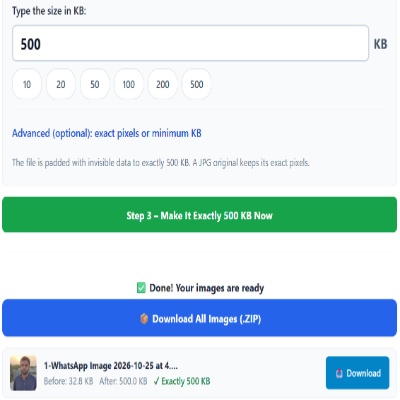
Advanced (optional): exact pixels or minimum KB
Many forms ask for pixels as well as KB. Leave empty if yours does not. Examples are common sizes only – always use the size your form states.
✅ Done! Your images are ready
500KB minimum files
Half a megabyte as a minimum is usually found on document portals expecting high-resolution scans. Padding a small file to this size makes the number match, but the document is as small in pixels as before. If the portal rejects based on dimensions, you will need a new scan.
Tips
- Try re-photographing the page closer to the camera before padding.
- Turn off any “data saver” setting in your camera or messaging app.
- If the upload widget shrinks files, use a desktop browser.
Pitfalls
- Type 500 and not 5. The box is in KB.
- Padding a very large image: if the file is already over 500KB, use Compress.
Check the total as well as the file
A 500KB minimum often appears next to a total limit for the whole application. Each padded file here is 512,000 bytes (500 × 1,024). Five of them come to about 2.5 MB once unzipped, even if the ZIP itself downloads smaller. Add up your files before uploading, and pad only the ones that actually fall under the minimum.
Questions about: Increase Image Size to 500KB
Why not just rescan?
If you can, rescan. Padding is for when the original is gone or the size is the only problem.
Does it help with a pixel requirement?
No. Use a larger original.
Is there a limit to how much I can pad?
The box accepts up to 20,480KB (20 MB).
About the Increase Image Size to 500KB tool
Use this page to bring a small image up to exactly 500KB when a form sets a minimum size. The tool adds invisible padding, so the picture looks the same and a JPG keeps its pixels.
How to use the Increase Image Size to 500KB tool
- Tap “Select Images” and choose your JPG, PNG, WebP or HEIC file.
- Make sure Increase (make bigger) is selected and the size box shows 500, or type the size your form states.
- Choose Increase (make bigger) and confirm the box shows 500.
- Press the green button, check the Before and After sizes, then download the file (or the ZIP if you added several).
More questions about Increase Image Size to 500KB
Which file types can I upload to reach 500KB?
JPG, PNG, WebP and HEIC files are accepted. The result is saved as a JPG.
How do I confirm the new size?
The result shows the Before and After sizes. You can also check the file details on your device after downloading.
Related sizes and tools
Need the opposite? Try Compress image to 500KB.
Every ready-made size is listed on the Image Resizer to KB page. Prefer a percentage instead of a KB size? Use the quality-based image compressor, or read our image guides.