Home › Image Resizer to KB › Compress Image to 100KB
Compress Image to 100KB
Set up for 100KB: job, visa and document upload limits.
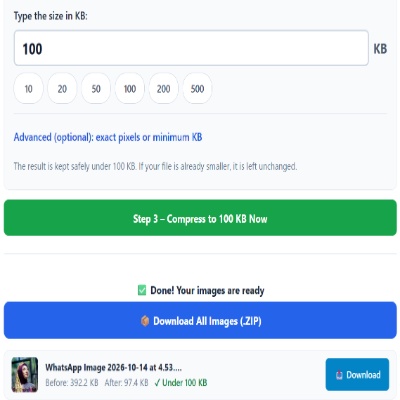
Advanced (optional): exact pixels or minimum KB
Many forms ask for pixels as well as KB. Leave empty if yours does not. Examples are common sizes only – always use the size your form states.
✅ Done! Your images are ready
100KB: enough for a face and for text
At 100KB you can keep a sharp portrait, around 600 × 750 pixels, and simple document scans stay readable. It is a common ceiling for ID proofs, certificates and photos on job and visa portals. Text on a document photo is the weak point: very small print blurs first.
What does “greater than 100 KB” mean on an upload form?
The wording decides which way you need to go. “File size must not be greater than 100 KB” (or “maximum 100 KB”) means the file has to be 100 KB or smaller, so a 340 KB photo is rejected and needs compressing. “Less than 100 KB” is stricter, so aim a little under, for example 90 to 95 KB.
The reverse wording, “must be greater than 100 KB” or “minimum 100 KB”, is a lower limit. A file that is too small is rejected, and you need to make it bigger, not smaller; use Increase image size to 100KB for that.
Also remember that some systems count 1 KB as 1,000 bytes and others as 1,024, so a file sitting right at the limit may pass on one form and fail on another. In Compress mode this tool aims for a file under 100,000 bytes, so the result should read below 100 KB either way; check the After size shown.
For documents
- Photograph the page straight on, filling the frame.
- Use daylight rather than flash; flash leaves a white glare patch.
- Check that numbers (dates, ID digits) are legible after compression. If not, ask whether a larger limit is allowed.
For photos
- A plain light background produces smaller, cleaner files.
- See our longer guide on reducing an image to a 100KB upload limit.
Mistakes
- Scanning a document in colour when black and white is allowed. Grey scans are far smaller.
- Exceeding the pixel size the portal accepts, even when the KB is fine.
Questions about: Compress Image to 100KB
Can I make a scanned certificate 100KB and keep it readable?
Usually yes if the scan is straight and well lit. Check the small print after compression and retry from the original if needed.
Is 100KB the same for a photo and a PDF?
This tool outputs JPG images. If a form wants a PDF, convert the compressed JPG afterwards.
How long does it take?
A few seconds per image on a modern phone. Large batches take longer because everything runs in your browser.
About the Compress Image to 100KB tool
This page shrinks an image to 100KB or less, a common limit for documents, photos and certificates on application portals. The tool picks the highest JPG quality that fits under your limit and reduces the pixel size only if quality alone cannot do it.
How to use the Compress Image to 100KB tool
- Tap “Select Images” and choose your JPG, PNG, WebP or HEIC file.
- The size box is already set to 100. Change it only if your form states a different limit.
- For a scanned certificate, keep the whole page in the frame and check that the text is readable in the result.
- Press the green button, check the Before and After sizes, then download the file (or the ZIP if you added several).
More questions about Compress Image to 100KB
Which file types can I upload for 100KB?
JPG, PNG, WebP and HEIC files are accepted, and the result is saved as a JPG.
Can I compress many pictures to 100KB together?
Yes. Select several files at once and each one gets the same 100KB limit. Download them individually or as one ZIP file.
Related sizes and tools
Need the opposite? Try Increase image size to 100KB.
Every ready-made size is listed on the Image Resizer to KB page. Prefer a percentage instead of a KB size? Use the quality-based image compressor, or read our image guides.