Home › Image Resizer to KB › Increase Image Size to 20KB
Increase Image Size to 20KB
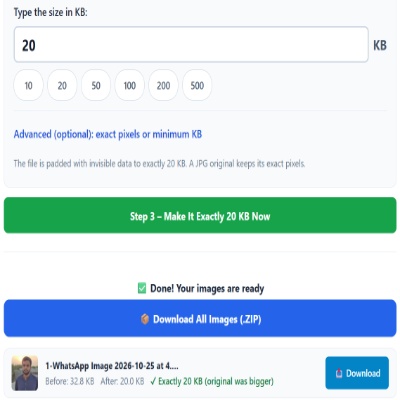
Bring a tiny file up to exactly 20KB for forms with a minimum size.
Advanced (optional): exact pixels or minimum KB
Many forms ask for pixels as well as KB. Leave empty if yours does not. Examples are common sizes only – always use the size your form states.
✅ Done! Your images are ready
When 20KB is a minimum
Signature and photo fields sometimes accept only files between two numbers, such as 10–20KB or “at least 20KB”. A neatly compressed signature can fall below the lower bound, and the portal replies with a vague “invalid file”. Padding to exactly 20KB puts the file on the boundary the form asks for.
Before you upload
- Check whether the range is inclusive. If “between 10 and 20KB” fails at exactly 20, try the Compress to 20KB page, which stays just under.
- If the form also checks pixels, enter them in Advanced options first.
- Do not open and re-save the padded file in an editor. That removes the padding.
Small-file pitfalls
- A PNG or WebP source is first converted to JPG, then padded.
- Photos of screens or documents compress well, so they are often the ones that come out too small.
Questions about: Increase Image Size to 20KB
Is the padded file exactly 20KB?
Yes: 20 × 1,024 = 20,480 bytes.
Will the signature look different?
No. A JPG source keeps its original pixels.
Why did the portal still reject it?
Check pixel dimensions, file type and whether it wants a stricter range. Padding only handles file size.
About the Increase Image Size to 20KB tool
Some forms reject files that are too small. This page makes a JPG exactly 20KB by adding invisible padding data to the file. It does not add detail or change how the picture looks, and a JPG keeps its pixels unchanged.
How to use the Increase Image Size to 20KB tool
- Tap “Select Images” and choose your JPG, PNG, WebP or HEIC file.
- Make sure Increase (make bigger) is selected and the size box shows 20, or type the size your form states.
- Switch the mode to Increase (make bigger) if it is not already selected, and check the size box says 20.
- Press the green button, check the Before and After sizes, then download the file (or the ZIP if you added several).
More questions about Increase Image Size to 20KB
Which file types can I upload to reach 20KB?
JPG, PNG, WebP and HEIC files are accepted. The result is saved as a JPG.
Does padding make the picture sharper?
No. The extra bytes are invisible filler. The picture looks the same, and only the file size changes.
Related sizes and tools
Need the opposite? Try Compress image to 20KB.
Every ready-made size is listed on the Image Resizer to KB page. Prefer a percentage instead of a KB size? Use the quality-based image compressor, or read our image guides.