Home › Image Resizer to KB › Compress Image to 200KB
Compress Image to 200KB
Compress to 200KB for document scans, blog photos and portal uploads.
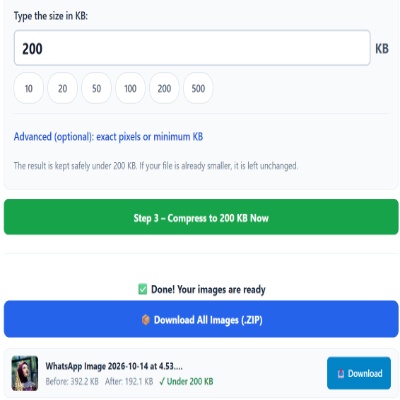
Advanced (optional): exact pixels or minimum KB
Many forms ask for pixels as well as KB. Leave empty if yours does not. Examples are common sizes only – always use the size your form states.
✅ Done! Your images are ready
200KB: the everyday ceiling
200KB is generous enough for a legible document scan and a good web photo around 1000 pixels wide. It is also a safe default when a portal asks for “a small file” without a number.
For best clarity
- Use black text on white paper and avoid shadows from your hand or phone.
- Do not tilt the page; straight pages compress better and read better.
- If a result looks soft, compare with the 300KB setting if the form allows it.
Where people go wrong
- Sending multi-page documents as one photo. Split pages and compress each.
- Using 200 as the size when the form actually allows 2 MB.
Questions about: Compress Image to 200KB
Is 200KB enough for an A4 scan?
For reading normal text, usually yes. For small print or stamps you may need 300–500KB.
Do I lose colours?
Colours stay, but heavy compression can band smooth gradients such as skies. At 200KB that is rare.
Can I pick a smaller width too?
Yes. Enter a width and height in Advanced options and the tool resizes before it fits the KB limit.
About the Compress Image to 200KB tool
Use this page to bring a photo or scanned page down to 200KB or less. At this size a document scan usually stays readable and a photo keeps good detail. The tool saves a JPG at the highest quality that fits your limit.
How to use the Compress Image to 200KB tool
- Tap “Select Images” and choose your JPG, PNG, WebP or HEIC file.
- The size box is already set to 200. Change it only if your form states a different limit.
- For a document scan, hold the camera straight above the page. A tilted shot compresses worse and reads worse.
- Press the green button, check the Before and After sizes, then download the file (or the ZIP if you added several).
More questions about Compress Image to 200KB
Which file types can I upload for 200KB?
JPG, PNG, WebP and iPhone HEIC files can be selected. You receive a JPG file.
Why is my result a bit under 200KB?
The tool picks the best quality that stays under the number you typed, so a small gap below the limit is normal. Set a minimum in Advanced if your form requires a range.
Related sizes and tools
Need the opposite? Try Increase image size to 200KB.
Every ready-made size is listed on the Image Resizer to KB page. Prefer a percentage instead of a KB size? Use the quality-based image compressor, or read our image guides.